
Image Reconstruction
[1]:
# This cells setups the environment when executed in Google Colab.
try:
    import google.colab
    !curl -s https://raw.githubusercontent.com/ibs-lab/cedalion/dev/scripts/colab_setup.py -o colab_setup.py
    # Select branch with --branch "branch name" (default is "dev")
    %run colab_setup.py
except ImportError:
    pass
What this notebook covers
This notebook demonstrates the complete DOT image reconstruction pipeline in Cedalion:
Load fNIRS data — finger-tapping recording with a sparse or high-density montage.
Preprocessing — motion correction, optical density conversion, bandpass filtering.
Block averaging — extract stimulus-locked epochs and compute trial averages.
Head model — load a
TwoSurfaceHeadModel(Colin27 or ICBM152).Coordinate systems — understand
digitized,ijk(voxel), andras/mnispaces.Optode registration — snap digitised optode positions to the scalp surface.
Forward model — compute or load pre-computed fluence via Monte Carlo (MCX) or finite-element (NIRFASTer) simulation; compute the sensitivity matrix.
Image reconstruction — invert the forward model to recover cortical HbO/HbR images from OD block averages.
Visualisation — scalp-projected GIFs, brain-surface animations, parcel-averaged haemodynamic responses.
Prerequisites: a working cedalion installation including PyVista. The forward model step requires either the pmcx package (NVIDIA GPU) or NIRFASTer (CPU). Pre-computed fluence files are provided via cedalion.data and used by default.
Notebook configuration
Decide for an example dataset with a sparse probe or a high-density probe for DOT. The notebook will load example data accordingly.
Also specify, if precomputed results of the photon propagation should be used and if the 3D visualizations should be interactive.
[2]:
# choose between two datasets
DATASET = "fingertappingDOT" # high-density montage
#DATASET = "fingertapping"   # sparse montage

# choose a head model
HEAD_MODEL = "colin27"
# HEAD_MODEL = "icbm152"

# choose between the monte
FORWARD_MODEL = "MCX" # photon monte carlo
#FORWARD_MODEL = "NIRFASTER" # finite element method - NOTE, you must have NIRFASTer installed via runnning <$ bash install_nirfaster.sh CPU # or GPU> from a within your cedalion root directory.

# set this flag to False to actual compute the forward model results
PRECOMPUTED_FLUENCE = True

# set this flag to True to enable interactive 3D plots
INTERACTIVE_PLOTS = False
[3]:
import pyvista as pv

if INTERACTIVE_PLOTS:
    pv.set_jupyter_backend('server')
else:
    pv.set_jupyter_backend('static')

import time
from pathlib import Path
from tempfile import TemporaryDirectory

import matplotlib.pyplot as p
import numpy as np
import xarray as xr
from IPython.display import Image

import cedalion
import cedalion.data
import cedalion.dataclasses as cdc
import cedalion.dot as dot
#import cedalion.dot.tissue_properties
#import cedalion.geometry.registration
#import cedalion.geometry.segmentation
#import cedalion.io
import cedalion.sigproc.motion as motion
import cedalion.vis.anatomy
import cedalion.vis.anatomy.sensitivity_matrix
import cedalion.vis.blocks as vbx
import cedalion.xrutils as xrutils
from cedalion import units
from cedalion.io.forward_model import FluenceFile, load_Adot

xrutils.unit_stripping_is_error()


xr.set_options(display_expand_data=False);
[4]:
# helper function to display gifs in rendered notbooks
def display_image(fname : str):
    display(Image(data=open(fname,'rb').read(), format='png'))
Working Directory
In this notebook the output of the fluence and sensitivity calculations are stored in a temporary directory. This will be deleted when the notebook ends.
[5]:
temporary_directory = TemporaryDirectory()
tmp_dir_path = Path(temporary_directory.name)
Load a finger-tapping dataset
For this demo we load an example finger-tapping recording through either cedalion.data.get_fingertapping or cedalion.data.get_fingertappingDOT.
The snirf files of these datasets contains a single NIRS element with one block of raw amplitude data.
[6]:
if DATASET == "fingertappingDOT":
    rec = cedalion.data.get_fingertappingDOT()
elif DATASET == "fingertapping":
    rec = cedalion.data.get_fingertapping()
else:
    raise ValueError("unknown dataset")
The location of the probes is obtained from the snirf metadata (i.e. /nirs0/probe/)
Note that units (‘m’) are adopted and the coordinate system is named ‘digitized’.
[7]:
geo3d_meas = rec.geo3d
display(geo3d_meas)
<xarray.DataArray (label: 346, digitized: 3)> Size: 8kB
[mm] -77.82 15.68 23.17 -61.91 21.23 56.49 ... 14.23 -38.28 81.95 -0.678 -37.03
Coordinates:
    type     (label) object 3kB PointType.SOURCE ... PointType.LANDMARK
  * label    (label) <U6 8kB 'S1' 'S2' 'S3' 'S4' ... 'FFT10h' 'FT10h' 'FTT10h'
Dimensions without coordinates: digitized[8]:
# visualize the montage
cedalion.vis.anatomy.plot_montage3D(rec["amp"], geo3d_meas)
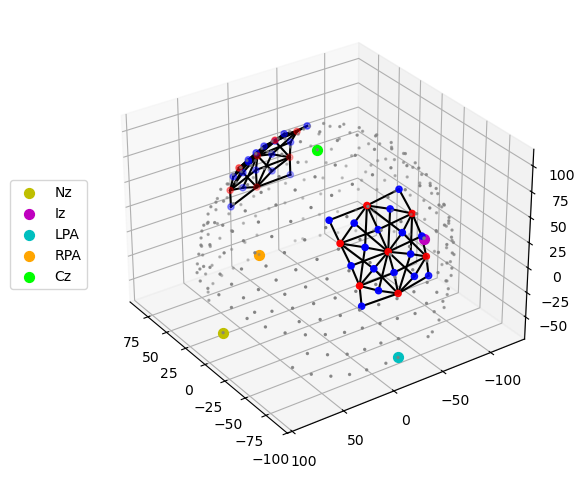
The measurement list is a pandas.DataFrame that describes which source-detector pairs form channels.
[9]:
meas_list = rec._measurement_lists["amp"]
display(meas_list.head(5))
| sourceIndex | detectorIndex | wavelengthIndex | wavelengthActual | wavelengthEmissionActual | dataType | dataUnit | dataTypeLabel | dataTypeIndex | sourcePower | detectorGain | moduleIndex | sourceModuleIndex | detectorModuleIndex | channel | source | detector | wavelength | chromo | |
|---|---|---|---|---|---|---|---|---|---|---|---|---|---|---|---|---|---|---|---|
| 0 | 1 | 1 | 1 | None | None | 1 | None | raw-DC | 1 | None | None | None | None | None | S1D1 | S1 | D1 | 760.0 | None |
| 1 | 1 | 2 | 1 | None | None | 1 | None | raw-DC | 1 | None | None | None | None | None | S1D2 | S1 | D2 | 760.0 | None |
| 2 | 1 | 4 | 1 | None | None | 1 | None | raw-DC | 1 | None | None | None | None | None | S1D4 | S1 | D4 | 760.0 | None |
| 3 | 1 | 5 | 1 | None | None | 1 | None | raw-DC | 1 | None | None | None | None | None | S1D5 | S1 | D5 | 760.0 | None |
| 4 | 1 | 6 | 1 | None | None | 1 | None | raw-DC | 1 | None | None | None | None | None | S1D6 | S1 | D6 | 760.0 | None |
Event/stimulus information is also stored in a pandas.DataFrame.
[10]:
rec.stim
[10]:
| onset | duration | value | trial_type | |
|---|---|---|---|---|
| 0 | 23.855104 | 10.0 | 1.0 | 1 |
| 1 | 54.132736 | 10.0 | 1.0 | 1 |
| 2 | 84.410368 | 10.0 | 1.0 | 1 |
| 3 | 114.688000 | 10.0 | 1.0 | 1 |
| 4 | 146.112512 | 10.0 | 1.0 | 1 |
| ... | ... | ... | ... | ... |
| 125 | 1431.535616 | 10.0 | 1.0 | 5 |
| 126 | 1526.038528 | 10.0 | 1.0 | 5 |
| 127 | 1650.819072 | 10.0 | 1.0 | 5 |
| 128 | 1805.418496 | 10.0 | 1.0 | 5 |
| 129 | 1931.116544 | 10.0 | 1.0 | 5 |
130 rows × 4 columns
For clarity, events are given more descriptive names:
[11]:
if DATASET == "fingertappingDOT":
   rec.stim.cd.rename_events( {
        "1": "Control",
        "2": "FTapping/Left",
        "3": "FTapping/Right",
        "4": "BallSqueezing/Left",
        "5": "BallSqueezing/Right"
    } )
elif DATASET == "fingertapping":
    rec.stim.cd.rename_events( {
        "1.0": "Control",
        "2.0": "FTapping/Left",
        "3.0": "FTapping/Right"
    } )

# count number of trials per trial_type
display(
    rec.stim.groupby("trial_type")[["onset"]]
    .count()
    .rename({"onset": "#trials"}, axis=1)
)
| #trials | |
|---|---|
| trial_type | |
| BallSqueezing/Left | 17 |
| BallSqueezing/Right | 16 |
| Control | 65 |
| FTapping/Left | 16 |
| FTapping/Right | 16 |
Preprocessing
Perform motion correction, conversion to optical density and bandpass filtering.
[12]:
rec["od"] = cedalion.nirs.cw.int2od(rec["amp"])
rec["od_tddr"] = motion.tddr(rec["od"])
rec["od_wavelet"] = motion.wavelet(rec["od_tddr"])

# bandpass filter the data
rec["od_freqfiltered"] = rec["od_wavelet"].cd.freq_filter(
    fmin=0.01, fmax=0.5, butter_order=4
)
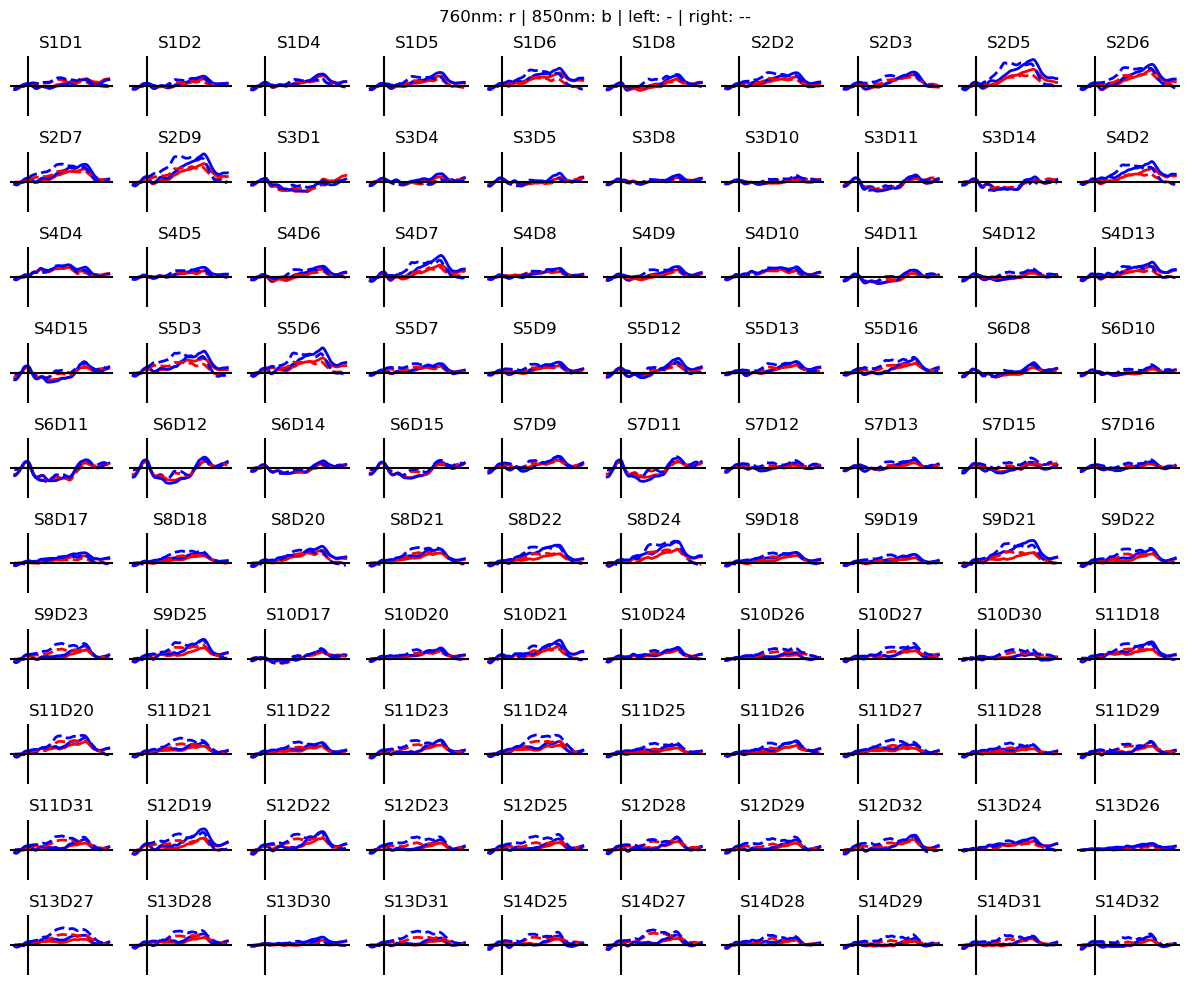
Calculate block averages in optical density
[13]:
# segment data into epochs
epochs = rec["od_freqfiltered"].cd.to_epochs(
    rec.stim,  # stimulus dataframe
    ["FTapping/Left", "FTapping/Right"],  # select fingertapping events, discard others
    before=5 * units.s,  # seconds before stimulus
    after=30 * units.s,  # seconds after stimulus
)

# calculate baseline
baseline = epochs.sel(reltime=(epochs.reltime < 0)).mean("reltime")

# subtract baseline
epochs_blcorrected = epochs - baseline

# group trials by trial_type. For each group individually average the epoch dimension
blockaverage = epochs_blcorrected.groupby("trial_type").mean("epoch")

# Plot block averages. Please ignore errors if the plot is too small in the HD case

noPlts2 = int(np.ceil(np.sqrt(len(blockaverage.channel))))
f,ax = p.subplots(noPlts2,noPlts2, figsize=(12,10))
ax = ax.flatten()
for i_ch, ch in enumerate(blockaverage.channel):
    for ls, trial_type in zip(["-", "--"], blockaverage.trial_type):
        ax[i_ch].plot(blockaverage.reltime, blockaverage.sel(wavelength=760, trial_type=trial_type, channel=ch), "r", lw=2, ls=ls)
        ax[i_ch].plot(blockaverage.reltime, blockaverage.sel(wavelength=850, trial_type=trial_type, channel=ch), "b", lw=2, ls=ls)

    ax[i_ch].grid(1)
    ax[i_ch].set_title(ch.values)
    ax[i_ch].set_ylim(-.02, .02)
    ax[i_ch].set_axis_off()
    ax[i_ch].axhline(0, c="k")
    ax[i_ch].axvline(0, c="k")

p.suptitle("760nm: r | 850nm: b | left: - | right: --")
p.tight_layout()
Coordinate systems
Up to now we have geometrical data from three different coordinate reference systems (CRS):
The optode positions are in one space
CRS='digitized'and the coordinates are in meter. In our example the origin is at the head center and y-axis pointing in the superior direction. Other digitization tools can use other units or coordinate systems.The segmentation masks are in voxel space (
CRS='ijk') in which the voxel edges are aligned with the coordinate axes. Each voxel has unit edge length, i.e. coordinates are dimensionless. Axis-aligned grids are computationally efficient, which is why the photon simulation code (MCX) uses this coordinate system.The voxel space (
CRS='ijk') is related to scanner space (CRS='ras') in which coordinates have physical units and coordinate axes point to the (r)ight, (a)nterior and s(uperior) directions. The relation between both spaces is given through an affine transformation (e.g.t_ijk2ras). When loading the segmentation masks in Slicer3D this transformation is automatically applied. Hence, the picked landmark coordinates are exported in RAS space.
The scanner space of the standard Colin27 and ICBM152 head models is called CRS='mni'. When loading a subject-specific nifiti file, the file contains a string label for the RAS space. Cedalion uses this string label to name the crs.
To avoid confusion between these different coordinate systems, cedalion tries to be explicit about which CRS a given point cloud or surface is in.
The TwoSurfaceHeadModel
The photon propagation considers the complete MRI scan, in which each voxel is attributed to one tissue type with its respective optical properties. However, the image reconstruction does not intend to reconstruct absorption changes in each voxel. The inverse problem is simplified, by considering only two surfaces (scalp and brain) and reconstruct only absorption changes in voxels close to these surfaces.
The class cedalion.dot.TwoSurfaceHeadModel groups together the segmentation mask, landmark positions and affine transformations as well as the scalp and brain surfaces. The brain surface is calculated by grouping together white and gray matter masks. The scalp surface encloses the whole head.
[14]:
head_ijk = dot.get_standard_headmodel(HEAD_MODEL)
head_ijk
[14]:
TwoSurfaceHeadModel(
  crs: ijk
  tissue_types: csf, gm, scalp, skull, wm
  brain faces: 49992 vertices: 25000 units: dimensionless
  scalp faces: 20096 vertices: 10050 units: dimensionless
  landmarks: 73
)
Segmentation masks:
[15]:
head_ijk.segmentation_masks
[15]:
<xarray.DataArray (segmentation_type: 5, i: 181, j: 217, k: 181)> Size: 36MB
0 0 0 0 0 0 0 0 0 0 0 0 0 0 0 0 0 0 0 ... 0 0 0 0 0 0 0 0 0 0 0 0 0 0 0 0 0 0 0
Coordinates:
  * segmentation_type  (segmentation_type) <U5 100B 'csf' 'gm' ... 'skull' 'wm'
Dimensions without coordinates: i, j, k
Landmarks:
[16]:
head_ijk.landmarks
[16]:
<xarray.DataArray (label: 73, ijk: 3)> Size: 2kB
[] 90.0 7.435 48.92 3.924 106.0 24.01 ... 127.4 25.63 109.0 139.8 26.66 93.47
Coordinates:
  * label    (label) <U3 876B 'Iz' 'LPA' 'RPA' 'Nz' ... 'PO1' 'PO2' 'PO4' 'PO6'
    type     (label) object 584B PointType.LANDMARK ... PointType.LANDMARK
Dimensions without coordinates: ijkBrain surface:
[17]:
head_ijk.brain
[17]:
TrimeshSurface(faces: 49992 vertices: 25000 crs: ijk units: dimensionless vertex_coords: ['fsaverage_vertex', 'parcel', 'mni152_r', 'mni152_a', 'mni152_s'])
Scalp Surface:
[18]:
head_ijk.scalp
[18]:
TrimeshSurface(faces: 20096 vertices: 10050 crs: ijk units: dimensionless vertex_coords: [])
The loaded head model is in voxel space (CRS='ijk'):
[19]:
head_ijk.crs
[19]:
'ijk'
The transformation matrix to translate from voxel to scanner space:
[20]:
head_ijk.t_ijk2ras
[20]:
<xarray.DataArray (mni: 4, ijk: 4)> Size: 128B
[mm] 1.0 0.0 0.0 -90.0 0.0 1.0 0.0 -126.0 0.0 0.0 1.0 -72.0 0.0 0.0 0.0 1.0
Dimensions without coordinates: mni, ijk
Change from voxel to scanner space. Note the changes in CRS and units.
The function TwoSurfaceHeadmodel.apply_transform transforms all surfaces and landmarks that comprise the head model.
[21]:
head_ras = head_ijk.apply_transform(head_ijk.t_ijk2ras)
print(f"CRS is now '{head_ras.crs}'")
print("Scalp surface:", head_ras.scalp)
print("Brain surface:", head_ras.brain)
print(f"Landmarks CRS: '{head_ras.landmarks.points.crs}' units: {head_ras.landmarks.pint.units}")
head_ras
CRS is now 'mni'
Scalp surface: TrimeshSurface(faces: 20096 vertices: 10050 crs: mni units: millimeter vertex_coords: [])
Brain surface: TrimeshSurface(faces: 49992 vertices: 25000 crs: mni units: millimeter vertex_coords: ['fsaverage_vertex', 'parcel', 'mni152_r', 'mni152_a', 'mni152_s'])
Landmarks CRS: 'mni' units: millimeter
[21]:
TwoSurfaceHeadModel(
  crs: mni
  tissue_types: csf, gm, scalp, skull, wm
  brain faces: 49992 vertices: 25000 units: millimeter
  scalp faces: 20096 vertices: 10050 units: millimeter
  landmarks: 73
)
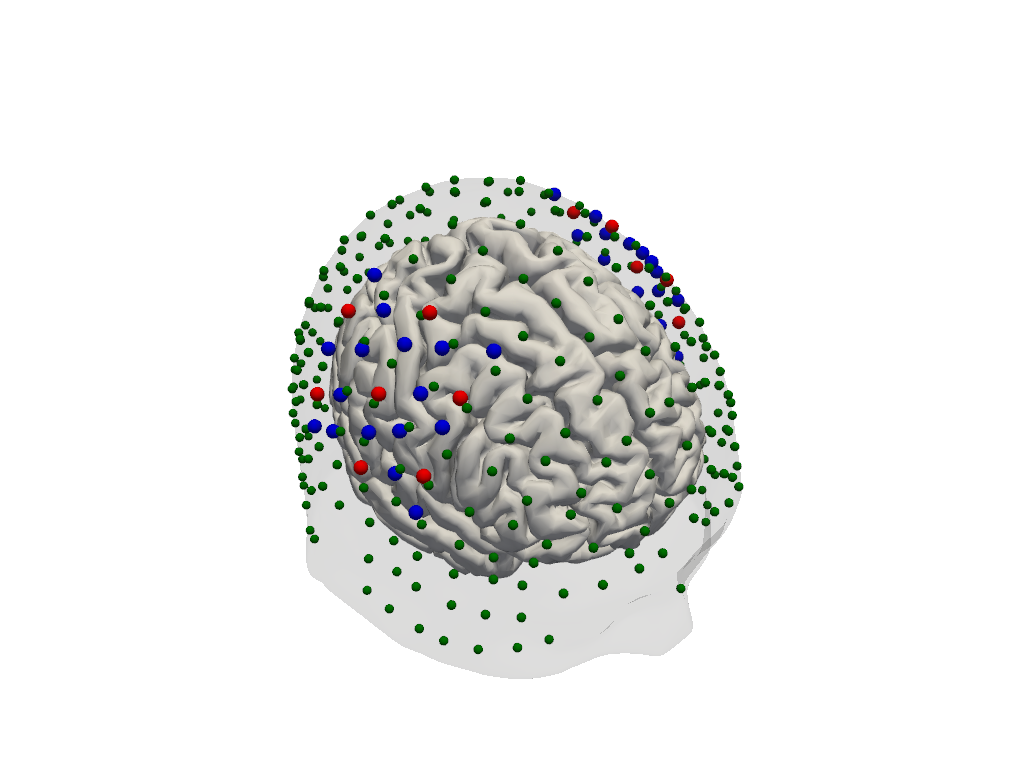
Optode Registration
The optode coordinates from the recording must be aligned with the scalp surface. Currently, cedaĺion offers only a simple registration method, which finds an affine transformation (scaling, rotating, translating) that matches the landmark positions of the head model and their digitized counter parts. Afterwards, optodes are snapped to the nearest vertex on the scalp.
[22]:
geo3d_snapped_ijk = head_ijk.align_and_snap_to_scalp(geo3d_meas)
display(geo3d_snapped_ijk)
<xarray.DataArray (label: 346, ijk: 3)> Size: 8kB
[] 15.1 140.9 100.2 30.75 144.6 130.6 ... 172.5 137.6 42.28 172.7 126.0 43.07
Coordinates:
    type     (label) object 3kB PointType.SOURCE ... PointType.LANDMARK
  * label    (label) <U6 8kB 'S1' 'S2' 'S3' 'S4' ... 'FFT10h' 'FT10h' 'FTT10h'
Dimensions without coordinates: ijk[23]:
plt = pv.Plotter()
vbx.plot_surface(plt, head_ijk.brain, color="w")
vbx.plot_surface(plt, head_ijk.scalp, opacity=.1)
vbx.plot_labeled_points(plt, geo3d_snapped_ijk)
plt.show()
Simulate light propagation in tissue
cedalion.dot.ForwardModel wraps the photon propagation codes pmcx and nirfaster.
Using the data in the head model it prepares the inputs for either pmcx or NIRFASTer and offers functionality to calculate the sensitivty matrix.
[24]:
fwm = dot.ForwardModel(head_ijk, geo3d_snapped_ijk, meas_list)
Run the simulation
The compute_fluence_mcx and compute_fluence_nirfaster methods simulate a light source at each optode position and calculate the fluence in each voxel. By setting RUN_PACKAGE, you can choose between the pmcx or NIRFASTer package to perform this simulation.
PLEASE NOTE: if you use precomputed data (download the example data) be aware that the file is quite big (~2GB).
[25]:
if PRECOMPUTED_FLUENCE:
    if FORWARD_MODEL == "MCX":
        fluence_fname = cedalion.data.get_precomputed_fluence(DATASET, HEAD_MODEL)
    elif FORWARD_MODEL == "NIRFASTER":
        raise NotImplementedError(
            "Currently there are no precomputed NIRFASTER results available"
        )
else:
    fluence_fname = tmp_dir_path / "fluence.h5"

    if FORWARD_MODEL == "MCX":
        fwm.compute_fluence_mcx(fluence_fname)
    elif FORWARD_MODEL == "NIRFASTER":
        fwm.compute_fluence_nirfaster(fluence_fname)
The photon simulation yields the fluence in each voxel for each wavelength. This is stored in two data structures:
fluence_allis an array with dimensions: (‘label’, ‘wavelength’, ‘i’, ‘j’, ‘k’),i.e. for each optode and wavelength it stores the 3D image of the computed fluence in each voxel
fluence_at_optodesis an array with dimensions: (‘optode1’, ‘optode2’, ‘wavelength’).It contains the fluence directly at the position of the optodes which is needed for normalization purposes.
Both arrays are stored on disk in a hdf5 file at fluence_fname. The class cedalion.io.forward_model.FluenceFile provides functions to query data from the file.
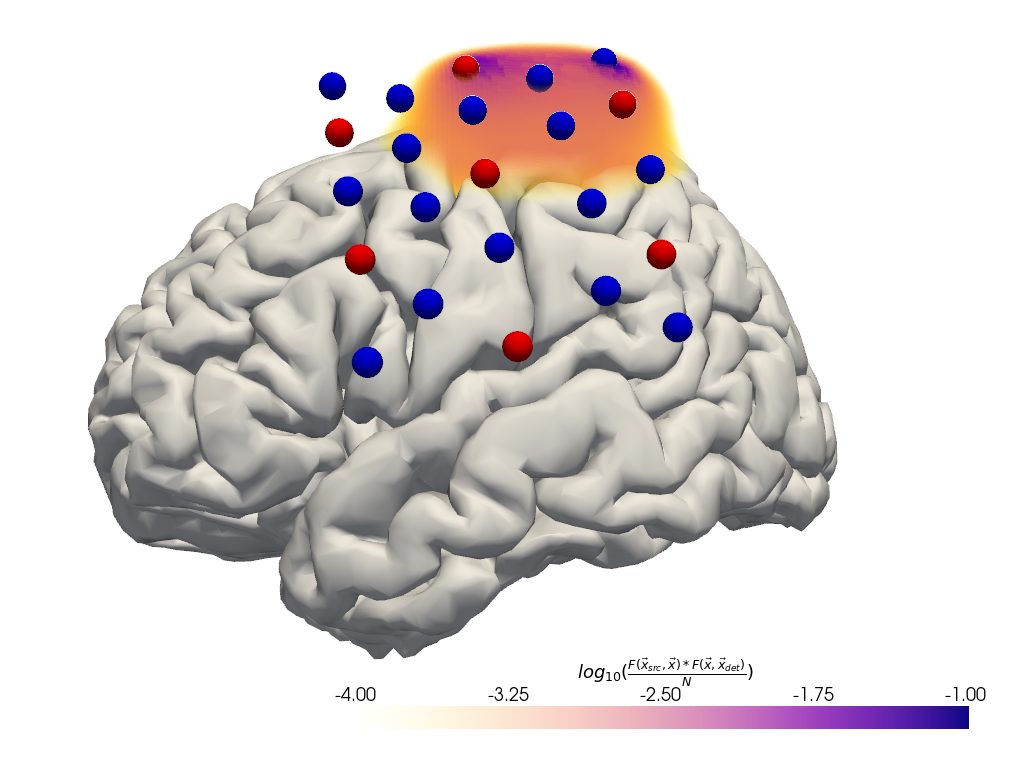
Plot fluence
To illustrate the tissue probed by light travelling from a source to the detector two fluence profiles need to be multiplied.
[26]:
# for plotting remove the landmarks from geo3d
geo3d_plot = geo3d_snapped_ijk[geo3d_snapped_ijk.type != cdc.PointType.LANDMARK]
[27]:
#time.sleep(1)

plt = pv.Plotter()

if DATASET == "fingertappingDOT":
    src, det, wl = "S5", "D16", 760
elif DATASET == "fingertapping":
    src, det, wl = "S2", "D3", 760
else:
    raise ValueError("unknown dataset")

# fluence_file.get_fluence returns a 3D numpy array with the fluence
# for a specified source and wavelength.
with FluenceFile(fluence_fname) as fluence_file:
    f = fluence_file.get_fluence(src, wl) * fluence_file.get_fluence(det, wl)
    fao = fluence_file.get_fluence_at_optodes()
    f /= 0.5 * (fao.loc[src, det, wl].values + fao.loc[det, src, wl].values)


f = np.log10(np.clip(f, min=f[f > 0].min()))
vf = pv.wrap(f)

print(f.min(), f.max())

plt.add_volume(
    vf,
    log_scale=False,
    cmap="plasma_r",
    clim=(-4, -1),
    scalar_bar_args={
        "title": r"$log_{10}("
        r"\frac{F(\vec{x}_{src},\vec{x}) * F(\vec{x}, \vec{x}_{det})}{N}"
        ")$"
    },
)
vbx.plot_surface(plt, head_ijk.brain, color="w")
vbx.plot_labeled_points(plt, geo3d_plot, show_labels=False)
vbx.camera_at_cog(plt, head_ijk.brain, rpos=[-350, 50, -50], fp_offset=[0, -10, 0])
plt.show()
-34.579556 0.41585714
Calculate the sensitivity matrices
The forward model’s function compute_sensitivity calculates the sensitivity matrix from the fluence file and saves the result in a new file.
[28]:
if PRECOMPUTED_FLUENCE:
    Adot = cedalion.data.get_precomputed_sensitivity(DATASET, HEAD_MODEL)
else:
    sensitivity_fname = tmp_dir_path / "sensitivity.h5"
    fwm.compute_sensitivity(fluence_fname, sensitivity_fname)
    Adot = load_Adot(sensitivity_fname)
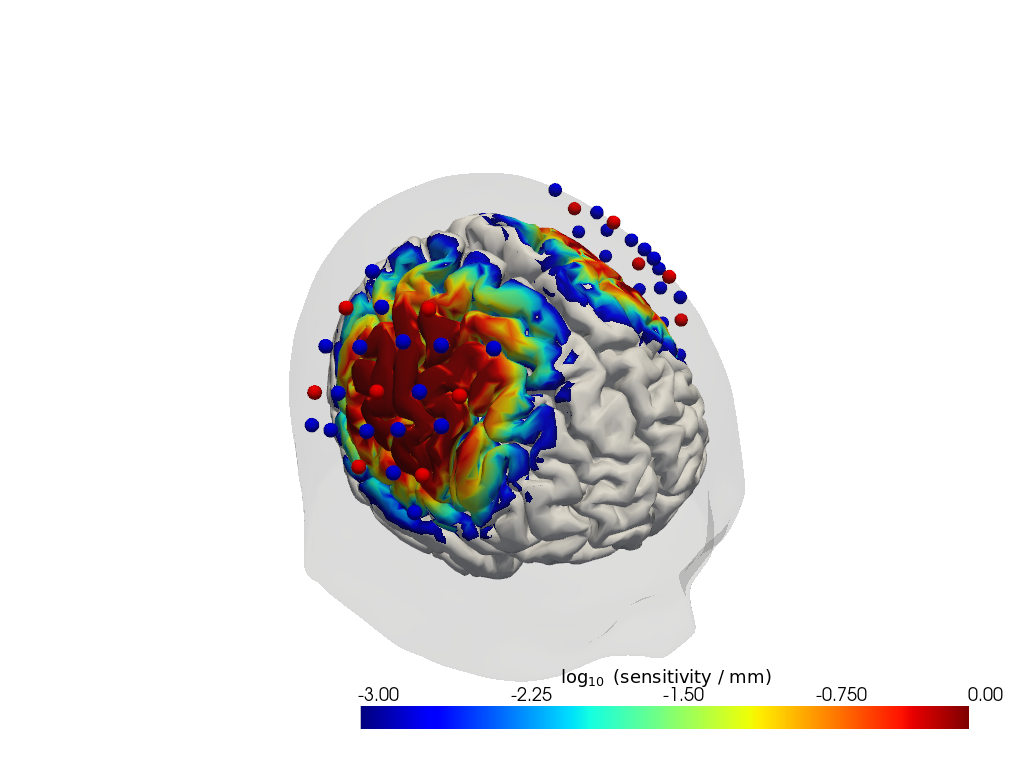
The sensitivity matrix describes how an absorption change at a given surface vertex changes the optical density in a given channel and wavelength.
The coordinate is_brain holds a mask to distinguish brain and scalp voxels.
[29]:
Adot
[29]:
<xarray.DataArray (channel: 100, vertex: 35050, wavelength: 2)> Size: 28MB
3.656e-17 3.656e-17 1.758e-18 1.758e-18 ... 8.413e-17 2.986e-15 2.986e-15
Coordinates:
    parcel      (vertex) object 280kB 'VisCent_ExStr_8_LH' ... 'scalp'
    is_brain    (vertex) bool 35kB True True True True ... False False False
  * channel     (channel) object 800B 'S1D1' 'S1D2' 'S1D4' ... 'S14D31' 'S14D32'
    source      (channel) object 800B 'S1' 'S1' 'S1' 'S1' ... 'S14' 'S14' 'S14'
    detector    (channel) object 800B 'D1' 'D2' 'D4' 'D5' ... 'D29' 'D31' 'D32'
  * wavelength  (wavelength) float64 16B 760.0 850.0
Dimensions without coordinates: vertex
Attributes:
units: mmPlot Sensitivity Matrix
[30]:
plotter = cedalion.vis.anatomy.sensitivity_matrix.Main(
    sensitivity=Adot,
    brain_surface=head_ijk.brain,
    head_surface=head_ijk.scalp,
    labeled_points=geo3d_plot,
)
plotter.plot(high_th=0, low_th=-3)
plotter.plt.show()
Run the image reconstruction
The class cedalion.dot.ImageRecon implements several methods to solve the inverse problem of reconstructing activations in brain and scalp tissue that would explain the measured optical density changes in channel space.
[31]:
recon = dot.ImageRecon(
    Adot,
    recon_mode="mua2conc",
    brain_only=False,
    alpha_meas=0.01,
    alpha_spatial=None,
    apply_c_meas=False,
    spatial_basis_functions=None,
)
In this example the channel-space block averages should be reconstructed into image space:
[32]:
blockaverage
[32]:
<xarray.DataArray (trial_type: 2, channel: 100, wavelength: 2, reltime: 154)> Size: 493kB
[] -0.001023 -0.001108 -0.001151 -0.001155 ... 0.0009149 0.001069 0.001239
Coordinates:
  * reltime     (reltime) float64 1kB -5.038 -4.809 -4.58 ... 29.54 29.77 30.0
  * channel     (channel) object 800B 'S1D1' 'S1D2' 'S1D4' ... 'S14D31' 'S14D32'
    source      (channel) object 800B 'S1' 'S1' 'S1' 'S1' ... 'S14' 'S14' 'S14'
    detector    (channel) object 800B 'D1' 'D2' 'D4' 'D5' ... 'D29' 'D31' 'D32'
  * wavelength  (wavelength) float64 16B 760.0 850.0
* trial_type (trial_type) object 16B 'FTapping/Left' 'FTapping/Right'Run the reconstruction and display results. Note how the OD time series with dimensions ('channel', 'wavelength', ...) transformed into a concentration time series with dimensions ('chromo', 'vertex', ...). The other dimensions ('trial_type', 'reltime') did not change.
The 'vertex' dimension has two coordinates:
is_brain: a boolean mask that discriminates between vertices on the brain and scalp surfacesparcel: a string label attributed to each vertex according to a brain parcellation scheme (see section ‘Parcel Space’)
[33]:
img = recon.reconstruct(blockaverage)
img
[33]:
<xarray.DataArray (chromo: 2, vertex: 35050, trial_type: 2, reltime: 154)> Size: 173MB
[µM] -3.874e-13 -3.899e-13 -3.809e-13 ... -1.189e-12 -1.195e-12 -1.177e-12
Coordinates:
  * chromo      (chromo) <U3 24B 'HbO' 'HbR'
    parcel      (vertex) object 280kB 'VisCent_ExStr_8_LH' ... 'scalp'
    is_brain    (vertex) bool 35kB True True True True ... False False False
  * reltime     (reltime) float64 1kB -5.038 -4.809 -4.58 ... 29.54 29.77 30.0
  * trial_type  (trial_type) object 16B 'FTapping/Left' 'FTapping/Right'
Dimensions without coordinates: vertexVisualizing image reconstruction results
In the following, different cedalion plot functions will be showcased to visualize concentration changes on the brain and scalp surfaces.
Channel Space
The function cedalion.vis.anatomy.scalp_plot_gif allows to create an animated gif of channel-space OD changes projected on the scalp.
Here, it is used to show the time course of the blockaveraged OD changes.
[34]:
# configure the plot
data_ts = blockaverage.sel(wavelength=850, trial_type="FTapping/Right")
# scalp_plot_gif expects the time dimension to be named 'time'
data_ts = data_ts.rename({"reltime": "time"})
filename_scalp = "scalp_plot_ts"

# call plot function
cedalion.vis.anatomy.scalp_plot_gif(
    data_ts,
    rec.geo3d,
    filename=filename_scalp,
    time_range=(-5, 30, 0.5) * units.s,
    scl=(-0.01, 0.01),
    fps=6,
    optode_size=6,
    optode_labels=True,
    str_title="OD 850 nm",
)
[35]:
display_image(f"{filename_scalp}.gif")
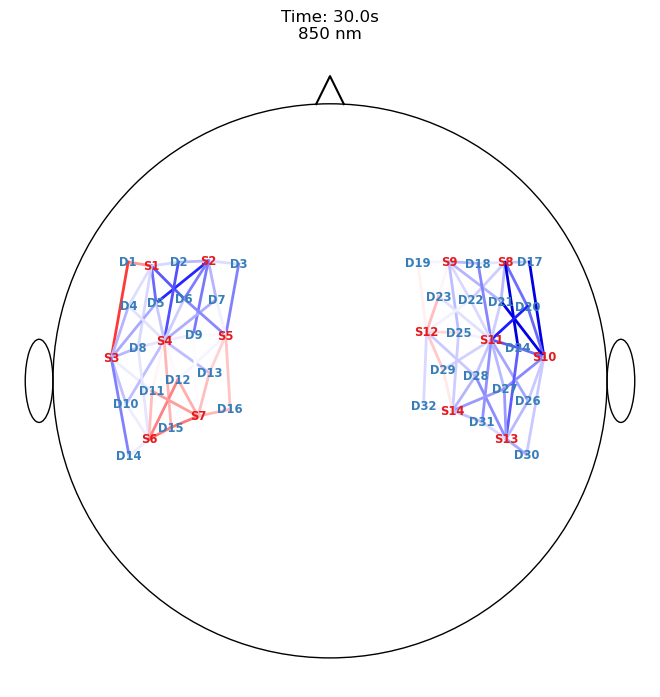
Image Space
Single-View Animations of Activitations on the Brain
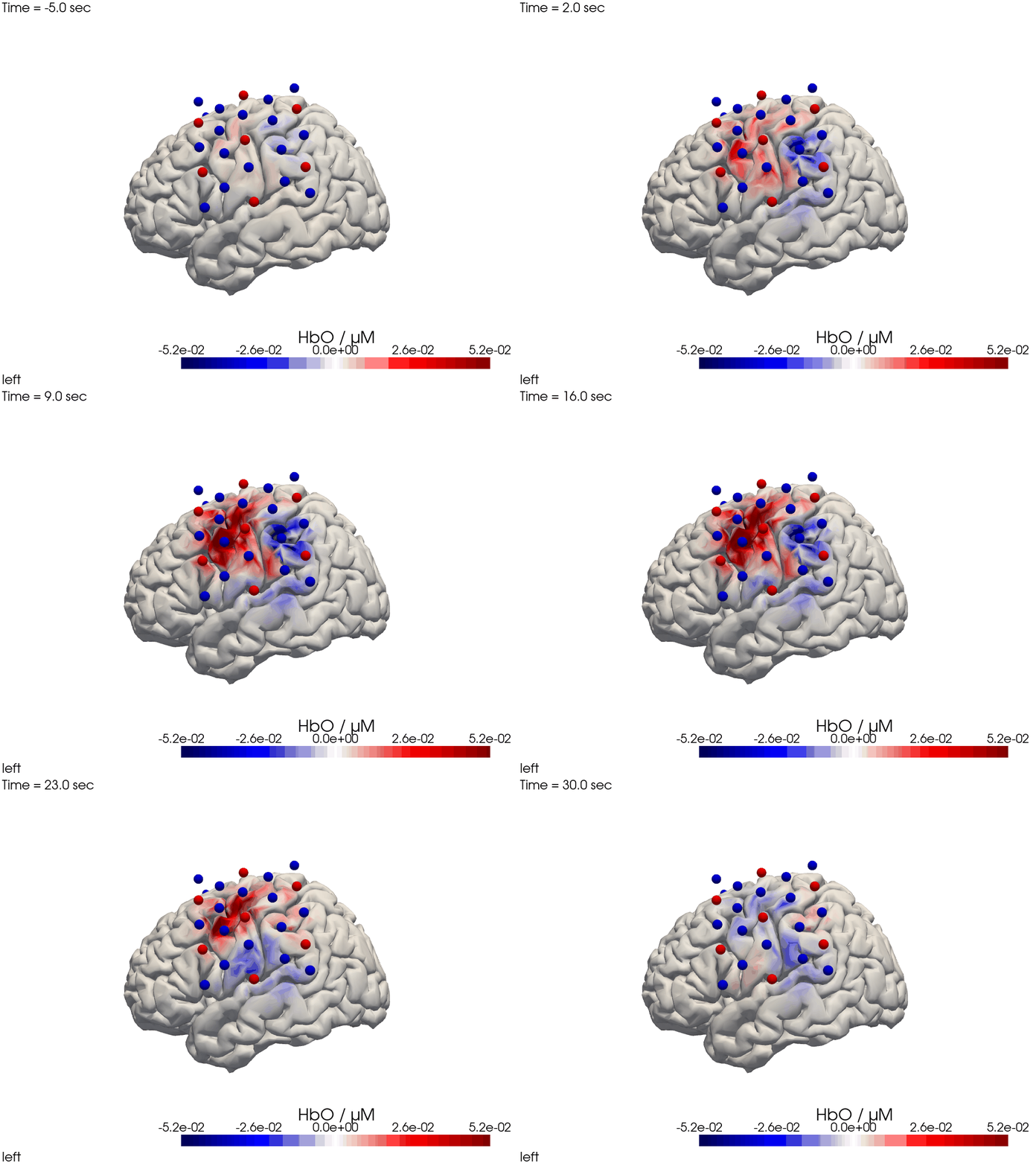
The function cedalion.vis.anatomy.image_recon_view allows to create an animated gif of image-space concentration changes projected on the brain.
[36]:
filename_view = 'image_recon_view'

# image_recon_view expects input with dimensions
# ("vertex", "chromo", "time") (in that order)
X_ts = img.sel(trial_type="FTapping/Right").rename({"reltime": "time"})
X_ts = X_ts.transpose("vertex", "chromo", "time")

scl = np.percentile(np.abs(X_ts.sel(chromo='HbO')).pint.dequantify(), 99)
clim = (-scl,scl)

cedalion.vis.anatomy.image_recon_view(
    X_ts,  # time series data; can be 2D (static) or 3D (dynamic)
    head_ijk,
    cmap='seismic',
    clim=clim,
    view_type='hbo_brain',
    view_position='left',
    title_str='HbO / µM',
    filename=filename_view,
    SAVE=True,
    time_range=(-5,30,0.5)*units.s,
    fps=6,
    geo3d_plot = geo3d_plot,
    wdw_size = (1024, 768)
)
[37]:
display_image(f"{filename_view}.gif")
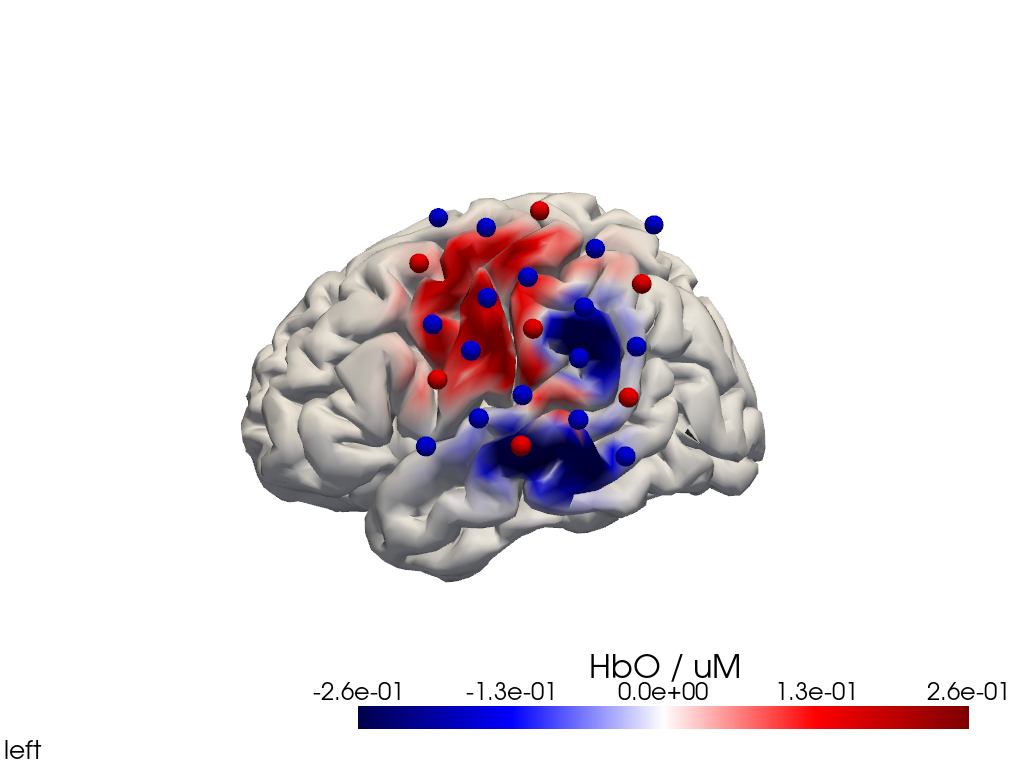
Alternatively, we can just select a single time point and plot activity as a still image at that time. Note the different file suffix (.png).
[38]:
# selects the nearest time sample at t=4s in X_ts
# note: sel does not accept quantified units
X_ts_plot = X_ts.sel(time=4, method="nearest")

filename_view = 'image_recon_view_still'

cedalion.vis.anatomy.image_recon_view(
    X_ts_plot,  # time series data; can be 2D (static) or 3D (dynamic)
    head_ijk,
    cmap='seismic',
    clim=clim,
    view_type='hbo_brain',
    view_position='left',
    title_str='HbO / µM',
    filename=filename_view,
    SAVE=True,
    time_range=(-5,30,0.5)*units.s,
    fps=6,
    geo3d_plot = geo3d_plot,
    wdw_size = (1024, 768)
)
[39]:
display_image(f"{filename_view}.png")
Multi-View Animations of Activitations on the Brain
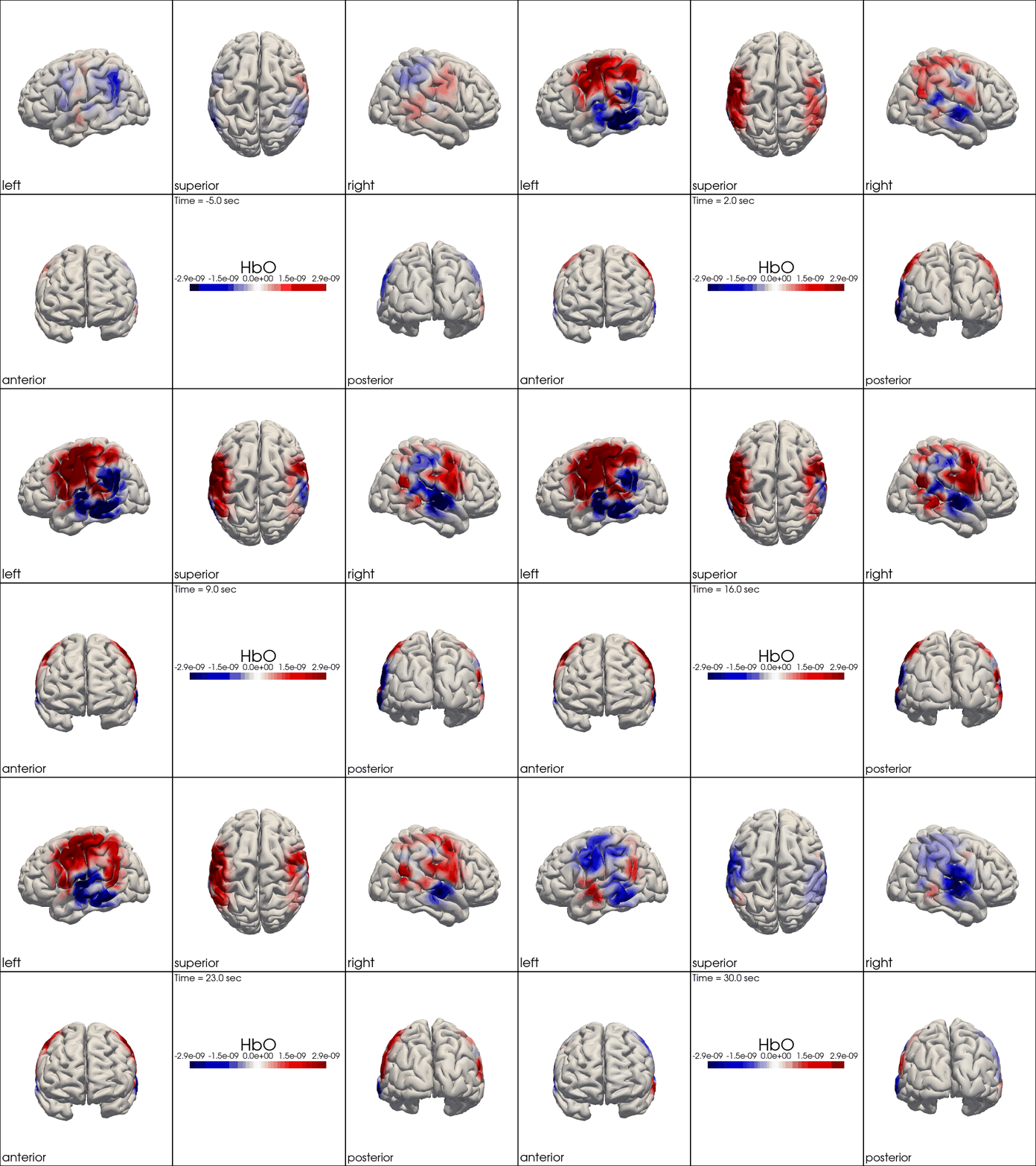
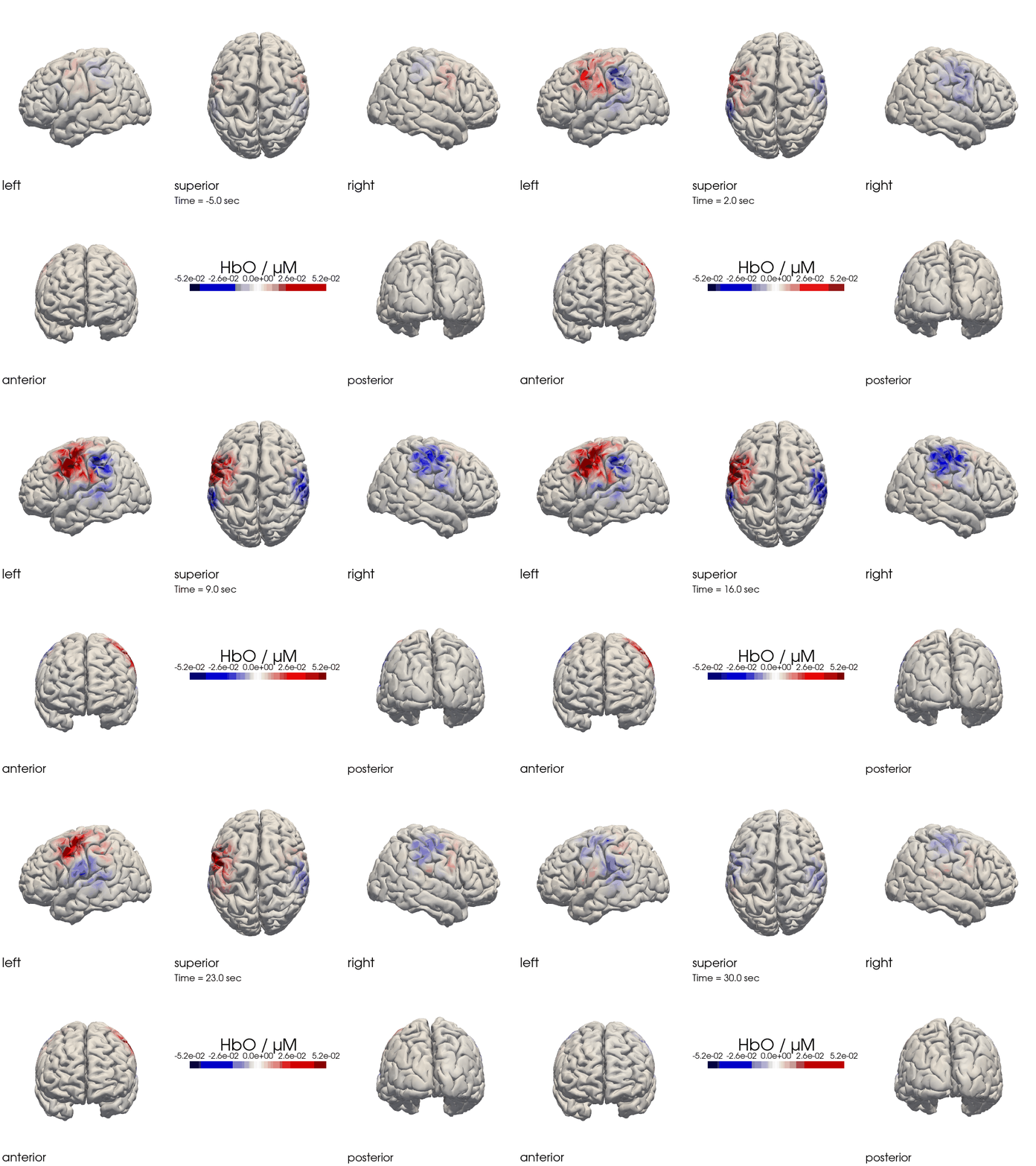
The function cedalion.vis.anatomy.image_recon_multi_view shows the activity on the brain from all angles as still image or animated across time:
[40]:
filename_multiview = 'image_recon_multiview'

# prepare data
X_ts = img.sel(trial_type="FTapping/Right").rename({"reltime": "time"})
X_ts = X_ts.transpose("vertex", "chromo", "time")

scl = np.percentile(np.abs(X_ts.sel(chromo='HbO')).pint.dequantify(), 99)
clim = (-scl,scl)

cedalion.vis.anatomy.image_recon_multi_view(
    X_ts,  # time series data; can be 2D (static) or 3D (dynamic)
    head_ijk,
    cmap='seismic',
    clim=clim,
    view_type='hbo_brain',
    title_str='HbO / µM',
    filename=filename_multiview,
    SAVE=True,
    time_range=(-5,30,0.5)*units.s,
    fps=6,
    geo3d_plot = None, #  geo3d_plot
    wdw_size = (1024, 768)
)
[41]:
display_image(f"{filename_multiview}.gif")
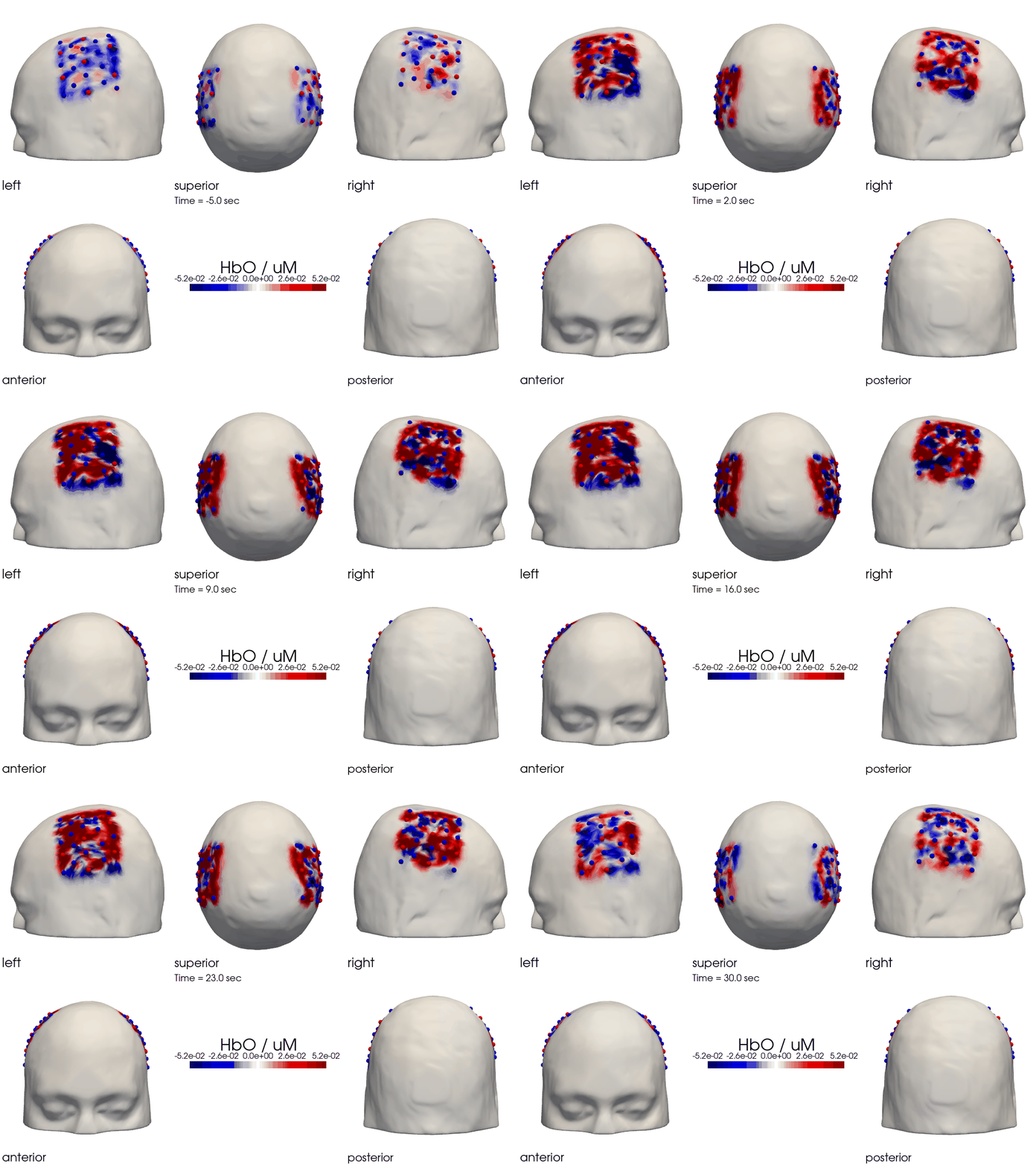
Multi-View Animations of Activitations on the Scalp
This gives us activity on the scalp after recon from all angles as still image or across time
[42]:
filename_multiview_scalp = 'image_recon_multiview_scalp'

# prepare data
X_ts = img.sel(trial_type="FTapping/Right").rename({"reltime": "time"})
X_ts = X_ts.transpose("vertex", "chromo", "time")

scl = np.percentile(np.abs(X_ts.sel(chromo='HbO')).pint.dequantify(), 99)
clim = (-scl,scl)

cedalion.vis.anatomy.image_recon_multi_view(
    X_ts,  # time series data; can be 2D (static) or 3D (dynamic)
    head_ijk,
    cmap='seismic',
    clim=clim,
    view_type='hbo_scalp',
    title_str='HbO / uM',
    filename=filename_multiview_scalp,
    SAVE=True,
    time_range=(-5,30,0.5)*units.s,
    fps=6,
    geo3d_plot = geo3d_plot,
    wdw_size = (1024, 768)
)
[43]:
display_image(f"{filename_multiview_scalp}.gif")
Parcel Space
The Schaefer Atlas [SKG+18] as implemented in Cedalion provides nearly 600 labels for different regions of the brain. Each vertex of the brain surface has its correspondng parcel label assigned as a coordinate.
[44]:
head_ijk.brain.vertices
[44]:
<xarray.DataArray (label: 25000, ijk: 3)> Size: 600kB
[] 82.52 19.84 68.31 83.52 20.32 65.89 ... 96.28 105.3 86.73 127.6 34.46 60.38
Coordinates:
  * label             (label) int64 200kB 0 1 2 3 4 ... 24996 24997 24998 24999
  * fsaverage_vertex  (label) int64 200kB 42 61 75 89 ... 333018 333020 333066
  * parcel            (label) object 200kB 'VisCent_ExStr_8_LH' ... 'VisCent_...
  * mni152_r          (label) float64 200kB -6.792 -5.846 -10.87 ... 6.633 37.95
  * mni152_a          (label) float64 200kB -104.8 -104.3 ... -19.16 -89.49
  * mni152_s          (label) float64 200kB -1.408 -3.845 ... 15.99 -10.04
Dimensions without coordinates: ijk
To obtain the average hemodynamic response in a parcel, the baseline-subtraced concentration changes of all vertices in a parcel are averaged. As baseline the first sample is used.
[45]:
# only consider brain vertices in the following.
img_brain = img.sel(vertex=img.is_brain)

# use the first sample along the reltime dimension as baseline
baseline =  img_brain.isel(reltime=0)
img_brain_blsubtracted = img_brain - baseline

display(img_brain_blsubtracted.rename("img_brain_blsubtracted"))
<xarray.DataArray 'img_brain_blsubtracted' (chromo: 2, vertex: 25000,
                                            trial_type: 2, reltime: 154)> Size: 123MB
[µM] 0.0 -2.515e-15 6.438e-15 2.746e-14 ... -4.107e-12 -4.126e-12 -4.017e-12
Coordinates:
  * chromo      (chromo) <U3 24B 'HbO' 'HbR'
    parcel      (vertex) object 200kB 'VisCent_ExStr_8_LH' ... 'VisCent_ExStr...
    is_brain    (vertex) bool 25kB True True True True ... True True True True
  * reltime     (reltime) float64 1kB -5.038 -4.809 -4.58 ... 29.54 29.77 30.0
  * trial_type  (trial_type) object 16B 'FTapping/Left' 'FTapping/Right'
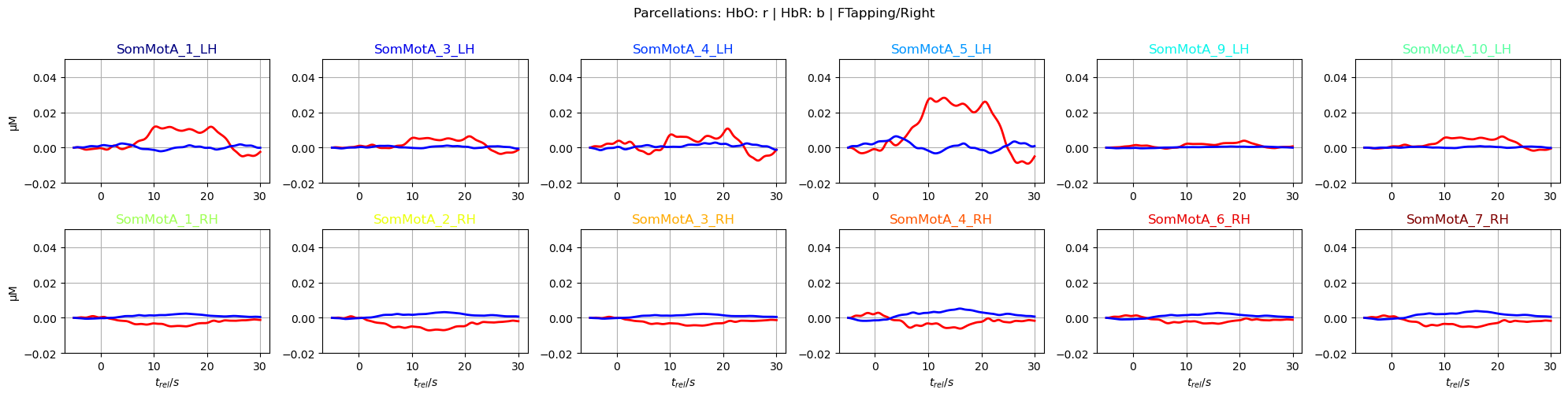
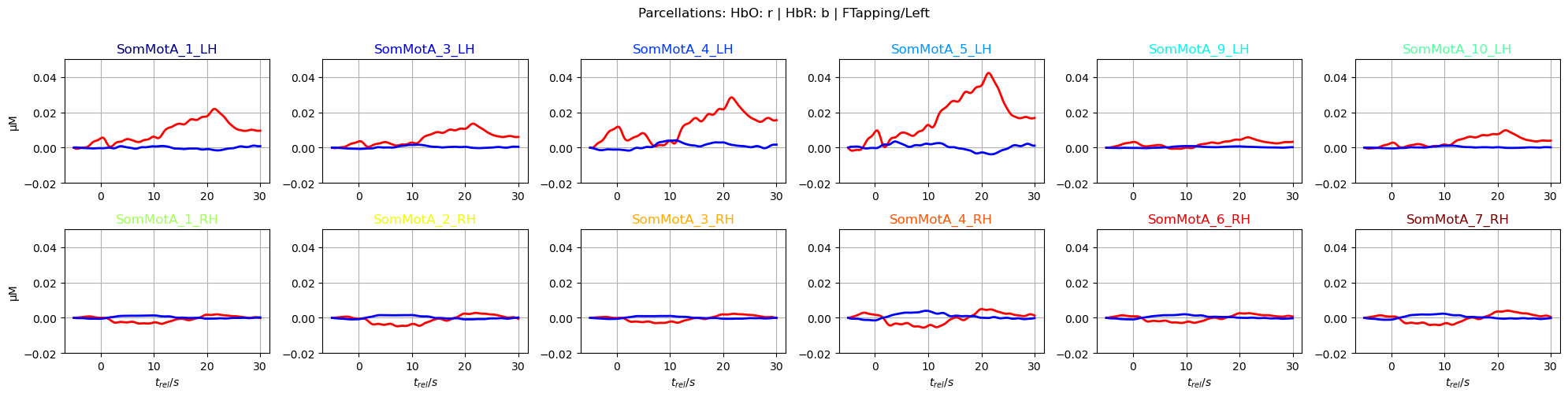
Dimensions without coordinates: vertexUsing parcel labels, vertices belonging to the same brain region can be easily grouped together with the DataArray.groupby function. On these vertex groups many reduction methods can be executed. He we use the function mean() to average over vertices.
Note how the time series dimension changed from vertex to parcel:
[46]:
# average over parcels
avg_HbO = img_brain_blsubtracted.sel(chromo="HbO").groupby('parcel').mean()
avg_HbR = img_brain_blsubtracted.sel(chromo="HbR").groupby('parcel').mean()

display(avg_HbO.rename("avg_HbO"))
<xarray.DataArray 'avg_HbO' (parcel: 601, trial_type: 2, reltime: 154)> Size: 1MB
[µM] 0.0 3.862e-11 1.17e-10 2.4e-10 ... 5.277e-14 5.148e-14 5.376e-14 5.723e-14
Coordinates:
    chromo      <U3 12B 'HbO'
  * reltime     (reltime) float64 1kB -5.038 -4.809 -4.58 ... 29.54 29.77 30.0
  * trial_type  (trial_type) object 16B 'FTapping/Left' 'FTapping/Right'
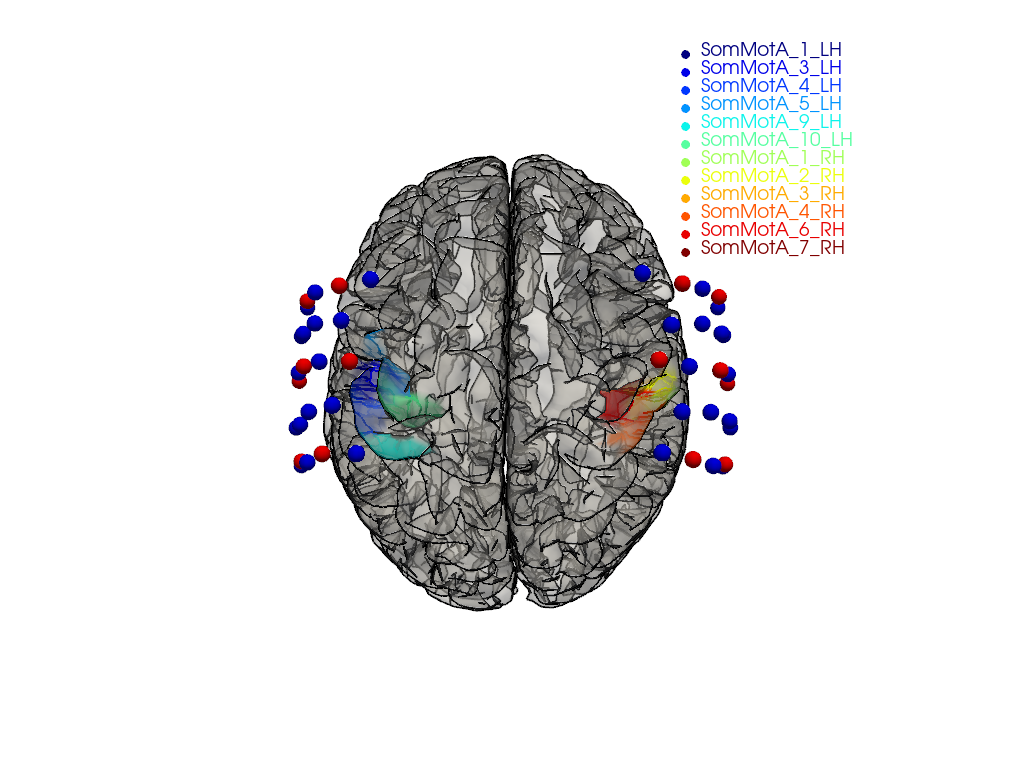
* parcel (parcel) object 5kB 'Background+FreeSurfer_Defined_Medial_Wal...The montage in this dataset covers only parts of the head. Consequently, many brain regions lack significant signal coverage due to the absence of optodes.
To focus on relevant regions, a subset of parcels from the somatosensory and motor regions in both hemispheres is selected.
[47]:
selected_parcels = [
    "SomMotA_1_LH", "SomMotA_3_LH", "SomMotA_4_LH",
    "SomMotA_5_LH", "SomMotA_9_LH", "SomMotA_10_LH",

    "SomMotA_1_RH", "SomMotA_2_RH", "SomMotA_3_RH",
    "SomMotA_4_RH", "SomMotA_6_RH", "SomMotA_7_RH"
]
The following plot visualizes the montage and the selected parcels:
[48]:
# map parcel labels to colors
parcel_colors = {
    parcel: p.cm.jet(i / (len(selected_parcels) - 1))
    for i, parcel in enumerate(selected_parcels)
}

plt = pv.Plotter()

vbx.plot_surface(
    plt,
    head_ijk.brain,
    color=np.asarray(
        [
            parcel_colors.get(parcel, (0.8, 0.8, 0.8, 0.3))
            for parcel in head_ijk.brain.vertices.parcel.values
        ]
    ),
    silhouette=True,
)

vbx.plot_labeled_points(plt, geo3d_plot)

plt.add_legend(labels=parcel_colors.items(), face="o", size=(0.3, 0.3))

vbx.camera_at_cog(plt, head_ijk.brain, rpos=(0, 0, 1), up=(0, 1, 0), fit_scene=True)
plt.show()
Plot averaged time traces in each parcel for the ‘FTapping/Right’ and ‘FTapping/Left’ conditions:
[49]:
f,ax = p.subplots(2,6, figsize=(20,5))
ylims = -0.02, 0.05
ax = ax.flatten()
for i_par, par in enumerate(selected_parcels):
    ax[i_par].plot(avg_HbO.sel(parcel = par, trial_type = "FTapping/Right").reltime, avg_HbO.sel(parcel = par, trial_type = "FTapping/Right"), "r", lw=2, ls='-')
    ax[i_par].plot(avg_HbR.sel(parcel = par, trial_type = "FTapping/Right").reltime, avg_HbR.sel(parcel = par, trial_type = "FTapping/Right"), "b", lw=2, ls='-')

    ax[i_par].grid(1)
    ax[i_par].set_title(par, color=parcel_colors[par])
    ax[i_par].set_ylim(*ylims)

    if i_par % 6 == 0:
        ax[i_par].set_ylabel("µM")
    if i_par >=6:
        ax[i_par].set_xlabel("$t_{rel} / s$")

p.suptitle("Parcellations: HbO: r | HbR: b | FTapping/Right", y=1)
p.tight_layout()

f,ax = p.subplots(2,6, figsize=(20,5))
ax = ax.flatten()
for i_par, par in enumerate(selected_parcels):
    ax[i_par].plot(avg_HbO.sel(parcel = par, trial_type = "FTapping/Left").reltime, avg_HbO.sel(parcel = par, trial_type = "FTapping/Left"), "r", lw=2, ls='-')
    ax[i_par].plot(avg_HbR.sel(parcel = par, trial_type = "FTapping/Left").reltime, avg_HbR.sel(parcel = par, trial_type = "FTapping/Left"), "b", lw=2, ls='-')

    ax[i_par].grid(1)
    ax[i_par].set_title(par, color=parcel_colors[par])
    ax[i_par].set_ylim(*ylims)

    if i_par % 6 == 0:
        ax[i_par].set_ylabel("µM")
    if i_par >=6:
        ax[i_par].set_xlabel("$t_{rel} / s$")

p.suptitle("Parcellations: HbO: r | HbR: b | FTapping/Left", y=1)
p.tight_layout()
References
[50]:
cedalion.bib.dump_to_notebook()
Methods used
| [1] | Tucker2022 | cedalion.io.snirf.read_snirf | Stephen Tucker, Jay Dubb, Sreekanth Kura, Alexander von Lühmann, Robert Franke, Jörn M. Horschig, Samuel Powell, Robert Oostenveld, Michael Lührs, Édouard Delaire, Zahra M. Aghajan, Hanseok Yun, Meryem A. Yücel, Qianqian Fang, Theodore J. Huppert, Blaise deB. Frederick, Luca Pollonini, David A. Boas, and Robert Luke. Introduction to the shared near infrared spectroscopy format. Neurophotonics, 10(1):013507, 2022. doi:10.1117/1.NPh.10.1.013507. |
| [2] | Delpy1988 | cedalion.nirs.cw.int2od | D. T. Delpy, M. Cope, P. van der Zee, S. Arridge, S. Wray, and J. Wyatt. Estimation of optical pathlength through tissue from direct time of flight measurement. Physics in Medicine and Biology, 33(12):1433–1442, 1988. doi:10.1088/0031-9155/33/12/008. |
| [3] | Villringer1997 | cedalion.nirs.cw.int2od | Arno Villringer and Britton Chance. Non-invasive optical spectroscopy and imaging of human brain function. Trends in Neurosciences, 20(10):435–442, 1997. doi:10.1016/S0166-2236(97)01132-6. |
| [4] | Fishburn2019 | cedalion.sigproc.motion.tddr | Frank A. Fishburn, Ruth S. Ludlum, Chandan J. Vaidya, and Andrei V. Medvedev. Temporal derivative distribution repair (tddr): a motion correction method for fnirs. NeuroImage, 184:171–179, 2019. doi:https://doi.org/10.1016/j.neuroimage.2018.09.025. |
| [5] | Fishburn2018 | cedalion.sigproc.motion.tddr | Frank Fishburn. Tddr. 2018. URL: https://github.com/frankfishburn/TDDR/. |
| [6] | Molavi2012 | cedalion.sigproc.motion.wavelet | Behnam Molavi and Guy A Dumont. Wavelet-based motion artifact removal for functional near-infrared spectroscopy. Physiological Measurement, 33(2):259, 2012. doi:10.1088/0967-3334/33/2/259. |
| [7] | Huppert2009 | cedalion.sigproc.motion.wavelet | Theodore J. Huppert, Solomon G. Diamond, Maria A. Franceschini, and David A. Boas. Homer: a review of time-series analysis methods for near-infrared spectroscopy of the brain. Appl. Opt., 48(10):D280–D298, Apr 2009. doi:https://doi.org/10.1364/AO.48.00D280. |
| [8] | Holmes1998 | cedalion.data.get_colin27_headmodel_files | Colin J. Holmes, Rick Hoge, Louis Collins, Roger Woods, Arthur W. Toga, and Alan C. Evans. Enhancement of mr images using registration for signal averaging. Journal of Computer Assisted Tomography, 22(2):324–333, March 1998. doi:10.1097/00004728-199803000-00032. |
| [9] | Fischl2012 | cedalion.data.get_colin27_headmodel_files | Bruce Fischl. FreeSurfer. NeuroImage, 62(2):774–781, 2012. doi:10.1016/j.neuroimage.2012.01.021. |
| [10] | Schaefer2018 | cedalion.data.get_colin27_headmodel_files | Alexander Schaefer, Ru Kong, Evan M Gordon, Timothy O Laumann, Xi-Nian Zuo, Avram J Holmes, Simon B Eickhoff, and BT Thomas Yeo. Local-global parcellation of the human cerebral cortex from intrinsic functional connectivity mri. Cerebral cortex, 28(9):3095–3114, 2018. doi:10.1093/cercor/bhx179. |
| [11] | Fang2009 | cedalion.data.get_precomputed_fluence, cedalion.data.get_precomputed_sensitivity | Qianqian Fang and David A Boas. Monte carlo simulation of photon migration in 3d turbid media accelerated by graphics processing units. Optics express, 17(22):20178–20190, 2009. doi:10.1364/OE.17.020178. |
| [12] | Yu2018 | cedalion.data.get_precomputed_fluence, cedalion.data.get_precomputed_sensitivity | Leiming Yu, Fanny Nina-Paravecino, David Kaeli, and Qianqian Fang. Scalable and massively parallel monte carlo photon transport simulations for heterogeneous computing platforms. Journal of biomedical optics, 23(1):010504–010504, 2018. doi:10.1117/1.JBO.23.1.010504. |
| [13] | Yan2020 | cedalion.data.get_precomputed_fluence, cedalion.data.get_precomputed_sensitivity | Shijie Yan and Qianqian Fang. Hybrid mesh and voxel based monte carlo algorithm for accurate and efficient photon transport modeling in complex bio-tissues. Biomedical Optics Express, 11(11):6262–6270, 2020. doi:10.1364/BOE.409468. |
| [14] | Carlton2026 | cedalion.dot.image_recon.ImageRecon.__init__ | Laura B. Carlton, Miray Altınkaynak, Shannon Kelley, Bernhard B. Zimmermann, Sreekanth Kura, Eike Middell, Alexander von Lühmann, Emily P. Stephen, Meryem A. Yücel, and David A. Boas. Surface-based image reconstruction optimization for high-density functional near-infrared spectroscopy. Neurophotonics, 13(2):025001, 2026. doi:10.1117/1.NPh.13.2.025001. |
| [15] | Markow2025 | cedalion.dot.image_recon.ImageRecon.__init__ | Zachary E. Markow, Jason W. Trobaugh, Edward J. Richter, Kalyan Tripathy, Sean M. Rafferty, Alexandra M. Svoboda, Mariel L. Schroeder, Tracy M. Burns-Yocum, Karla M. Bergonzi, Mark A. Chevillet, Emily M. Mugler, Adam T. Eggebrecht, and Joseph P. Culver. Ultra high density imaging arrays in diffuse optical tomography for human brain mapping improve image quality and decoding performance. Scientific Reports, 15(1):3175, January 2025. doi:10.1038/s41598-025-85858-7. |
| [16] | Prahl1998 | cedalion.nirs.common.get_extinction_coefficients | Scott A. Prahl. Optical absorption of hemoglobin. Oregon Medical Laser Center, online resource, 1998. URL: https://omlc.org/spectra/hemoglobin/. |