Getting started with contributing code to Cedalion
This document is a brief guide for contributors who would like to add code or
new functionality to Cedalion. The toolbox is designed to be useful both for
researchers who apply existing workflows and for developers who build new methods.
Because the codebase is still growing, we follow a bottom-up approach: write
simple functions with clear inputs and outputs first, then wrap them in higher-level
abstractions once the API has stabilised. Develop and test in Jupyter notebooks (which
can later be contributed as examples), then migrate mature code into src/cedalion/.
Where to get started
Familiarise yourself with these five resources before contributing:
Documentation: The rendered documentation is at doc.ibs.tu-berlin.de/cedalion/doc/dev/.
Example notebooks: Located in
examples/, grouped by topic, and viewable in rendered form on the documentation site. Running and modifying existing notebooks is the fastest way to understand the API.xarray: Cedalion’s primary data container. Familiarise yourself with
xarray.DataArrayandxarray.Dataset. All processing functions accept and return DataArrays. See the xarray documentation.pint units: Cedalion tracks physical units using pint via
pint-xarray. Import units withfrom cedalion import Quantity, unitsand attach them to variables, e.g.sd_distance = 3 * units.cm. Functions should acceptpint.Quantityarguments wherever a physical unit is meaningful.Data containers: The main container is
Recording, which holds named timeseries DataArrays, optode positions, stimulus events, and optional head model data. The code snippet below shows how to load a recording and access its contents:
import cedalion
import cedalion.nirs.cw as nirs
import xarray as xr
from cedalion import units

rec = cedalion.data.get_fingertapping()   # returns a Recording
amp = rec.timeseries["amp"]              # raw amplitude, dims: (channel, wavelength, time)

od = nirs.int2od(amp)
dpf = xr.DataArray(
    [6.0, 6.0],
    dims="wavelength",
    coords={"wavelength": amp.wavelength},
)
conc = nirs.od2conc(od, rec.geo3d, dpf)  # HbO / HbR concentration, dims: (channel, chromo, time)
General rules and overview
Style guide for Python code
We follow PEP 8. The Ruff linter is configured in pyproject.toml and enforces rules E, F, W, and D (Google docstrings). Run ruff check src/ tests/ before committing.
Key conventions:
Functions and variables:
snake_case— e.g.def example_function(),my_variable = 1.Classes:
PascalCase— e.g.class MyProcessor.Module-level constants:
UPPER_CASE— e.g.MAX_OVERFLOW = 100.Max line length: 88 characters.
Style guide for docstrings
Use Google-style docstrings
for all public functions, classes, and methods. Include Args:, Returns:, and
Raises: sections where applicable.
Example — simple function:
def func(arg1: int, arg2: str) -> bool:
    """One sentence description of function.

    Some more details on what the function does.

    Args:
        arg1: Description of arg1.
        arg2: Description of arg2.

    Returns:
        Description of return value.
    """
    return True
Example — function with typed scientific arguments:
def func(
    arg1: cdt.NDTimeSeries,
    arg2: cdt.NDTimeSeries,
    arg3: Quantity,
) -> cdt.NDTimeSeries:
    """Implements algorithm XY based on :cite:t:`BIBTEXLABEL`.

    Some more details on what the function does.

    Args:
        arg1 (:class:`NDTimeSeries`, (channel, wavelength, time)): Description of
            first argument. For NDTimeSeries, specify expected dimensions.
        arg2 (:class:`NDTimeSeries`, (time, *)): Algorithms that operate only along
            one dimension (e.g. frequency filtering) are agnostic to other dimensions.
            Document this with ``(time, *)``.
        arg3 (:class:`Quantity`, [time]): Parameters with physical units should be
            passed as pint Quantities. Document the expected dimensionality.

    Returns:
        Description of return value.
    """
    return True
Literature references
Add references to cedalion/bibliography/references.bib with a unique BibTeX label.
Cite them in docstrings with:
:cite:t:`BIBTEXLABEL`
In Markdown notebook cells, cite with:
{cite:t}`BIBTEXLABEL`
In functions, call:
cedalion.cite(BIBTEXLABEL)
All references are listed on the References page. If citations
do not render correctly, check the Sphinx output for duplicate or malformed entries in
references.bib.
Each call to cedalion.cite is recorded in the container
cedalion.bib. The user can obtain references for all used methods by executing
cedalion.bib.dump_to_notebook at the end of a notebook.
Where to add code
Incorporate new code into the existing module structure. Python files (modules) contain functions of the same category; directories (subpackages) contain related modules. For example:
Two artefact correction methods
SplineSGandtPCAboth belong insigproc/motion.py.motion.pyandquality.pyboth belong insigproc/.
Only create a new module or subpackage if the code genuinely does not fit anywhere existing. If in doubt, open an issue or pull request for discussion first.
GitHub workflow
Cedalion uses GitHub for version control and code review. The dev branch is always
the most up-to-date integration branch — always branch off dev, never off
main.
Fork or clone the repository and make sure your local
devis up to date:git checkout dev git pull upstream dev
Create a feature branch from
dev:git checkout -b feature/my-new-feature
Use a short, descriptive name prefixed with
feature/for new functionality orfix/for bug fixes.Develop, test, and lint your changes:
ruff check src/ tests/
pytest tests/
Open a pull request on GitHub targeting the
devbranch (notmain). Describe what the PR does and link any related issues. The code will be merged after review.
main reflects the latest stable release and is only updated by maintainers during
a release process. Direct commits to main or dev are not accepted.
File and folder structure
The repository is organised into four top-level directories:
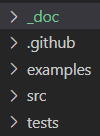
docs: Sphinx documentation source.
examples: Jupyter notebooks grouped by topic. Each notebook should be self-contained and annotated for a researcher new to the API. Add a notebook here whenever you introduce significant new functionality.
src: The library source code under
src/cedalion/.tests: pytest unit tests mirroring the
src/cedalion/structure.
The src/cedalion/ directory is organised as follows:
Directory |
Purpose |
|---|---|
data |
Lookup tables and small bundled datasets. |
dataclasses |
Core containers: |
geometry |
3D geometry: optode registration, head segmentation, meshing, landmarks. |
dot |
DOT image reconstruction pipeline. |
io |
Reading and writing SNIRF, BIDS, probe geometries, anatomies, and other formats. |
models |
Data modelling, e.g. the General Linear Model ( |
nirs |
NIRS physics: |
sigdecomp |
Signal decomposition methods not in standard libraries (ICA variants, CCA, mSPoC). |
sigproc |
Time-series signal processing: filtering, motion artefact correction, quality assessment, epoch extraction. |
sim |
Simulation and data augmentation: synthetic HRFs, artefacts, and toy datasets. |
vis |
Visualisation utilities. |
Example: contributing new functionality
As a worked example we will add a channel quality check and pruning step — the
kind of thing found in src/cedalion/sigproc/quality.py.
Decide where the code belongs
After browsing src/, we decide that quality-assessment helpers belong in
sigproc/quality.py. Once added, users import them with:
import cedalion.sigproc.quality as quality
Bare-bones function template
import cedalion.dataclasses as cdc
import cedalion.typing as cdt
from cedalion import Quantity, units


@cdc.validate_schemas
def function_name(timeseries: cdt.NDTimeSeries, threshold: Quantity):
    """Short one-line summary.

    Args:
        timeseries: Input fNIRS data with at least ``channel`` and ``time`` dims.
        threshold: Quality threshold with appropriate units.

    Returns:
        Description of the return value.
    """

    # YOUR CODE

    return something
The @cdc.validate_schemas decorator checks that timeseries matches the
NDTimeSeries schema (requires at least channel and time dimensions) and raises
a descriptive error at runtime if the input does not match.
Worked example: SNR check and channel pruning
The current quality module provides snr, sci, and prune_ch. Here is how
they fit together — illustrating the pattern you should follow for new metrics:
import cedalion.sigproc.quality as quality
from cedalion import units

# 1. Compute individual quality metrics (each returns a value array and a boolean mask)
snr, snr_mask = quality.snr(amp, snr_thresh=2.0)
sci, sci_mask = quality.sci(amp, window_length=5 * units.s, sci_thresh=0.7)

# 2. Combine masks and drop failing channels
#    operator="all"  →  keep channel only if it passes every mask
#    operator="any"  →  keep channel if it passes at least one mask
amp_pruned, dropped = quality.prune_ch(amp, [snr_mask, sci_mask], operator="all")

print("Dropped channels:", dropped)
Both snr_mask and sci_mask are boolean DataArrays (True = clean,
False = tainted). prune_ch combines them and removes channels that fail. Add a
new metric by writing a function that returns (metric, mask) with the same
convention — it will plug directly into prune_ch.
For the full current implementation, see sigproc/quality.py.
Creating example notebooks
After adding a feature, create a Jupyter notebook in the appropriate subfolder of
examples/. To set the thumbnail shown in the examples gallery, add the tag
nbsphinx-thumbnail to the cell that produces the representative figure (the IBS
logo is used by default if no tag is set).
Concluding remarks
While the toolbox continues to grow, we will add containers and abstraction layers to simplify usage. Whenever the existing environment does not yet provide the level of abstraction you need, develop bottom up: write simple functions with clear inputs and outputs. Once a general container ties together the relevant data, it is straightforward to refactor. We are working on higher-level pipeline mechanisms that will make it easy to assemble lower-level functions into reusable workflows.